Build
Generating diagrams
Drawing an architecture by hand takes an afternoon; describing it takes a minute. Generation turns text into a structured diagram: typed nodes, flow edges, nested zones, and column-level lineage where the input carries it. The output is a real canvas document, not an image, so everything the generator produces can be edited afterwards.
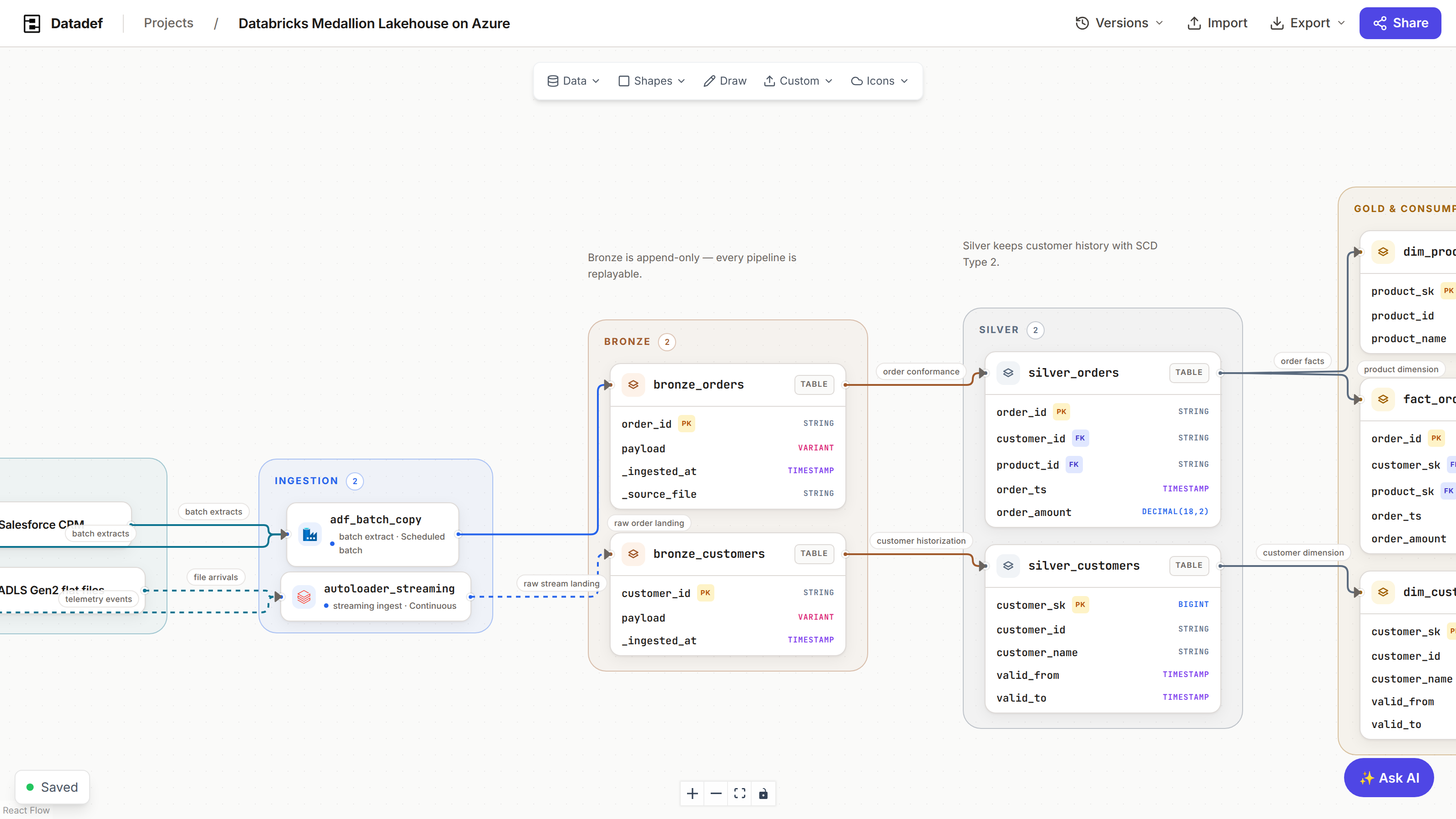
How it works
- 1Describe the system in the prompt bar, or paste Terraform, SQL, dbt, or OpenAPI text, or attach files.
- 2Name what matters. The technologies, zones, and tables you name are treated as a specification, not a suggestion.
- 3Datadef generates an overview-scoped diagram a reader can follow in one pass, with icons for the technologies it recognizes.
- 4Refine the result on the canvas or through the AI panel; every generated element stays editable.
Where you can generate
- The dashboard prompt bar. Creates a new cloud project from a description or attached files.
- The scratch canvas at /scratch, without an account.
- The AI panel on the canvas. Edits the open diagram in place: "add a staging zone", "collapse the ingestion tier".
- An AI agent over MCP, with the
create_diagramandedit_diagramtools. See MCP and agents. - A connected repository, where the input is the code itself. See Repositories.
Writing a prompt that works
The diagram is only as detailed as the description. The generator does not pad a thin prompt with invented services, so the difference between a generic diagram and your platform is what you name:
- Name the actual technologies. "Snowflake, dbt, Airflow, Kafka, Fivetran" draws those, with their icons. "A data pipeline" draws a guess.
- Name the layers or zones you want. Zone names you give are treated as a specification, not a suggestion: ask for "bronze, silver, gold" and you get exactly those three zones.
- Name the tables that matter. Tables you name arrive as table nodes with columns, which is what makes column-level lineage possible later.
Pasting Terraform, SQL, dbt, or OpenAPI text
The prompt field accepts infrastructure and schema text directly. Paste Terraform resources, SQL DDL, a dbt_project.yml with model SQL, or an OpenAPI spec, and the generator reads the structure out of it rather than treating it as prose.
A schema on its own is not sent to the AI at all. SQL DDL (including MySQL and pg_dump exports) and Prisma schemas are parsed: every table, column type, primary key and foreign key comes out exactly as written, in a second or two. When the DDL declares no foreign keys, as warehouse DDL usually does, links are read from matching key names (fct_sales.customer_key to dim_customer.customer_key) and drawn dashed. Add a sentence such as "turn these into a star schema" and the request goes to the generator instead, with your DDL as its source. A paste longer than the prompt box becomes an attachment and is read whole.
You can also attach files. Accepted types:
| Kind | Extensions |
|---|---|
| Documents | .pdf .md .txt .docx .doc .pptx .ppt |
| Schemas | .sql .ddl .prisma |
| Diagrams and data | .xml .drawio .json .csv |
| Images | .png .jpg .jpeg .webp .svg |
A reference image is recreated structurally: the generator reproduces its zones, nesting, and components in Datadef's own visual language. It does not trace pixels, and layout is recomputed.
Scope: overview and detailed
Generation runs against an explicit size budget:
- Overview (the default): 12 to 20 nodes, no more connections than nodes. Repeated objects collapse into one node stating the count, and supporting tiers like governance or monitoring get at most one node each. This is the right scope for almost every request; a reader should follow the whole flow in one pass.
- Detailed: 25 to 40 nodes carrying full fields, schedules, contracts, and owners. Reserved for when depth is explicitly asked for. Today the detailed scope is exposed through the MCP
create_diagramtool'sscopeparameter; in-app generation uses the overview budget.
Why the budget exists
A dense 40-node diagram is impressive and usually not what anyone wanted from a one-line request. Overview first, then expand the parts that deserve it on the canvas or through the AI panel.
What a generation costs
Generation is the one metered part of Datadef. It is paid for in credits, bought once and never expiring, and nothing else on the canvas costs anything:
| Where | Cost |
|---|---|
| Anonymous, on the scratch canvas | 1 AI generation a day, enforced server-side, resets daily. No account and no credits involved. |
| Signed in, from a prompt or attached files | 1 credit, or 3 for the detailed scope. |
| An AI edit, from the canvas panel or over MCP | 2 credits per turn. |
| A repository sync | 2 credits when the branch moved and the diagram was regenerated, nothing when it had not. |
A generation that fails, and an AI edit that changes nothing, are refunded automatically. When the balance is empty only new generation pauses: existing diagrams stay open, editable by hand, exportable, and shareable. See Credits and billing.
Further reading