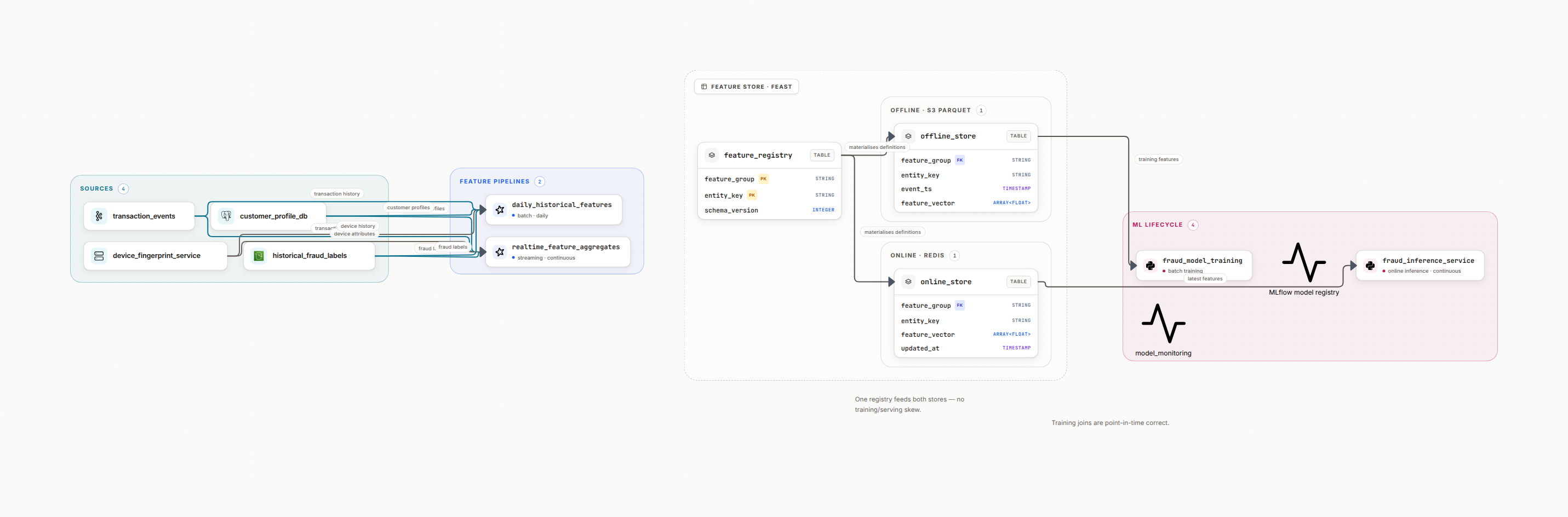
1. Why ML Pipeline Architecture Matters
Getting a model to 95% accuracy in a Jupyter notebook is exciting. Getting that model to serve 1 million predictions per day reliably is engineering. The difference between research and production is architecture, the systems that train, deploy, monitor, and improve models continuously.
The Production Gap
You will see a percentage quoted for how many ML projects never reach production. Skip the number, which nobody can source, and keep the mechanism it points at. Models stall between the notebook and the serving path, because deployment, monitoring and retraining were nobody's job while the model was being built.
A good ML architecture delivers four outcomes:
Reliable Predictions
Models serve predictions with 99.9% uptime and <100ms latency. No more "the model is down" tickets at 3am.
Continuous Improvement
Automated retraining pipelines keep models fresh. Deploy new versions weekly or daily without manual intervention.
Observability
Track model accuracy, drift, and business metrics in real-time. Know when models degrade before users notice.
Team Velocity
Data scientists iterate on models without waiting for engineers. Shared infrastructure means faster experiments.
From experience
I've seen teams with brilliant models fail because they had no serving infrastructure. I've also seen teams with average models win because they could deploy 10x faster. Architecture is your competitive advantage.
2. Core ML Pipeline Components
Every production ML system has seven essential components. They work together like an assembly line: data flows in, models train, predictions flow out. Here's what each component does and why you need it.
Data Ingestion
FoundationCollect raw data from databases, APIs, events, and logs. Store in data lake (S3/GCS) or warehouse (Snowflake/BigQuery).
Tools: Fivetran, Airbyte, Kafka, AWS Kinesis, dbt for transformations
Feature Engineering
CriticalTransform raw data into model features. Compute aggregations, encodings, embeddings. Store in feature store for reuse.
Tools: Feast, Tecton, Databricks Feature Store, custom pipelines (Spark/dbt)
Training Pipeline
CoreTrain models on historical data. Track experiments, hyperparameters, and metrics. Validate on holdout sets.
Tools: MLflow, Weights & Biases, Kubeflow, Vertex AI, SageMaker Training
Model Registry
VersioningStore trained models with versioning. Track which model is in production, staging, archived. Include metadata.
Tools: MLflow Model Registry, Vertex AI Model Registry, custom S3 + metadata DB
Serving Infrastructure
ProductionDeploy models as REST APIs or batch jobs. Handle scaling, load balancing, and failover automatically.
Tools: TensorFlow Serving, TorchServe, Seldon, KServe, AWS SageMaker, Vertex AI
Monitoring & Observability
OperationsTrack model performance, data drift, prediction latency, errors. Alert when models degrade.
Tools: Arize, WhyLabs, Evidently AI, custom Grafana + Prometheus dashboards
Orchestration
AutomationCoordinate training, validation, deployment. Schedule retraining jobs. Manage dependencies between steps.
Tools: Airflow, Prefect, Dagster, Kubeflow Pipelines, AWS Step Functions
| Component | Purpose | Latency | Critical for |
|---|---|---|---|
| Data Ingestion | Collect raw data | Minutes to hours | Data freshness |
| Feature Engineering | Transform to features | Batch: hours / Online: ms | Model quality |
| Training | Create models | Hours to days | Accuracy |
| Registry | Version models | Instant | Governance |
| Serving | Generate predictions | <100ms | User experience |
| Monitoring | Track performance | Real-time | Reliability |
| Orchestration | Automate workflows | Varies | Automation |
3. Common ML Architecture Patterns
Different ML use cases need different architectures. A recommendation system has different requirements than fraud detection. Five patterns cover most of what runs in production, and the choice between them is usually decided by latency and retraining cadence rather than by the model.
Batch Prediction Pipeline
Generate predictions for all users overnight. Store predictions in database. Serve pre-computed results.
Best for
- Product recommendations
- Customer churn scores
- Email targeting lists
- Daily risk assessments
Trade-offs
- Predictions can be stale (6-24 hours)
- Can't respond to real-time events
- Requires storage for all predictions
Real-Time Serving Pipeline
Predict on-demand when users make requests. Fetch features in real-time, call model API, return result.
Best for
- Fraud detection
- Dynamic pricing
- Content personalization
- Credit decisioning
Trade-offs
- Higher infrastructure costs
- Complex feature serving layer
- Need low-latency models
Online Learning Pipeline
Update models continuously as new data arrives. No batch retraining, models evolve in real-time.
Best for
- Ad click prediction
- News recommendations
- Real-time bidding
- Anomaly detection
Trade-offs
- Complex to implement
- Limited model types (linear, trees)
- Harder to debug drift
Hybrid Batch + Real-Time
Compute heavy features in batch, compute fast features real-time. Combine both for predictions.
Best for
- E-commerce search ranking
- Ride-share pricing
- Lending decisions
- Complex personalization
Trade-offs
- Most complex to build
- Two feature pipelines to maintain
- Synchronization challenges
Edge ML Pipeline
Deploy models to edge devices (phones, IoT, browsers). Run predictions locally without server calls.
Best for
- Mobile apps (face recognition)
- IoT devices (predictive maintenance)
- Offline-first applications
- Privacy-sensitive use cases
Trade-offs
- Model size constraints (<10MB)
- Limited compute power
- Harder to update models
Choosing Your Pattern
Start with batch prediction if you can tolerate 6-24 hour delays. It's the simplest and cheapest. Move to real-time serving only when latency matters for the business. Add online learning when your data changes faster than daily retraining can handle. Batch is the default for most models, and real-time is the exception you justify per use case rather than the standard you build toward.
4. Step-by-Step ML Pipeline Design Process
Designing an ML pipeline is like planning a road trip. You need to know your starting point (data sources), destination (business metric), and the stops along the way (features, model, predictions). Here's a proven 7-step process.
Define Business Objective & Success Metrics
Start with the business goal, not the model. What decision will this ML system improve? How will you measure success?
Example: E-commerce Search Ranking
- Objective: Increase product purchases from search
- Primary Metric: Search-to-purchase conversion rate
- Secondary: Click-through rate, revenue per search
- Model Metric: NDCG@10 (ranking quality)
Map Data Sources & Availability
Identify where your data lives and how fresh it needs to be. This determines your pipeline architecture.
For Training
- User behavior logs (S3)
- Product catalog (PostgreSQL)
- Purchase history (Snowflake)
- Can be 1-7 days old
For Serving
- Real-time user context (session data)
- Product metadata (Redis cache)
- User profile (Feature store)
- Must be <50ms latency
Design Feature Pipeline
Plan how raw data transforms into model features. Separate slow (batch) and fast (online) features.
Batch Features (computed daily)
User 30-day purchase count, average basket size, category preferences
Online Features (computed on request)
Search query, current cart contents, time of day, device type
Choose Training Infrastructure
Select training tools based on model complexity, data size, and retraining frequency.
| Data Size | Model Type | Infrastructure |
|---|---|---|
| <10GB | XGBoost, LightGBM | Single VM, Jupyter |
| 10GB-1TB | Neural nets, Ensembles | GPU VM, SageMaker |
| >1TB | Deep learning | Distributed (Spark, Ray) |
Design Serving Architecture
Choose between batch predictions (pre-compute overnight) or real-time API (compute on-demand).
Batch Serving
Predict for all users → Store in DB → Application reads pre-computed scores
Best for: Daily emails, nightly reports, recommendation lists
Real-Time API
User request → Fetch features → Call model → Return prediction (<100ms)
Best for: Fraud detection, dynamic content, instant decisions
Implement Monitoring & Alerts
Track three categories: model performance, system health, and business impact.
Model Metrics
Accuracy, precision, recall, AUC
System Health
Latency, error rate, throughput
Business KPIs
Conversion, revenue, engagement
Automate Retraining & Deployment
Set up orchestration to retrain models automatically when performance degrades or on schedule.
Daily 2AM: Extract features → Train model → Validate accuracy
→ If accuracy > threshold: Deploy to staging
→ Run A/B test (10% traffic)
→ If conversion improves: Promote to production
Start Simple, Iterate
Don't build everything at once. Start with manual training + batch predictions. Add real-time serving when needed. Add automated retraining after you have baseline monitoring. Each step should take 1-2 weeks, not months.
5. ML Architecture Best Practices
These are the patterns that separate production ML systems from prototypes. Learn from teams who have deployed hundreds of models at scale.
Use Feature Stores for Consistency
The #1 cause of production ML failures is training-serving skew: features computed differently in training vs production. Feature stores solve this by centralizing feature definitions.
Rule: Define features once. Compute offline for training (batch Spark job), online for serving (Redis/DynamoDB). Same code, different execution engines.
Monitor Data Drift, Not Just Model Metrics
Your model accuracy can stay high even as predictions become useless. Why? Input data distribution changed. Monitor feature distributions and alert when they drift.
Track: Mean, std dev, nulls, outliers for every feature. Compare production vs training distributions weekly.
Version Everything: Data, Features, Models, Code
When a model fails, you need to reproduce the exact training run. That means versioning data snapshots, feature transformations, model binaries, and training code together.
Pattern: Each model version links to: data snapshot (S3 path), feature commit (Git SHA), training code version, hyperparameters.
Build for Rollback, Not Just Rollout
New models will fail. Plan for it. Keep the previous model version deployed. Route 90% traffic to old, 10% to new. If metrics degrade, instant rollback.
Pattern: Shadow mode → 10% canary → 50% test → 100% production. Rollback is one button click, not a 2-hour emergency deployment.
Optimize for Inference Cost, Not Training Cost
You train once, serve millions of times. A model that costs $100 to train but $10,000/month to serve is a bad trade. Consider model size, latency, and GPU requirements early.
Decision tree: Can a smaller model (distilled BERT → DistilBERT) achieve 95% of accuracy at 1/10 the cost? That's usually the right trade.
Implement Circuit Breakers & Fallbacks
ML models aren't databases: they can fail in creative ways. Always have a fallback: rule-based system, cached predictions, or graceful degradation.
Example: If fraud model times out → fallback to simple heuristics. If search ranking fails → show popularity-based results. Never show errors to users.
6. ML Pipeline Tools & Platforms
The ML tooling landscape is overwhelming. Here's a curated list of tools that actually matter, organized by component.
Feature Stores
Open Source
- Feast: Lightweight, best for startups. Supports offline (S3/Snowflake) + online (Redis) features.
- Feathr (LinkedIn): Enterprise-grade, complex setup. Great for large-scale batch features.
Managed
- Tecton: Best-in-class, expensive. Real-time features, monitoring, lineage built-in.
- Databricks Feature Store: Great if you're already on Databricks. Tight Delta Lake integration.
Training & Experiment Tracking
Experiment Tracking
- MLflow: Industry standard, free. Tracks experiments, models, deployments.
- Weights & Biases: Best UI, great for research. Real-time visualizations.
- Neptune.ai: Enterprise features, metadata organization.
Training Platforms
- AWS SageMaker: End-to-end AWS. Training, tuning, serving integrated.
- Google Vertex AI: GCP equivalent. Great AutoML.
- Azure ML: Azure integration. Strong enterprise features.
Model Serving
Open Source
- TensorFlow Serving: Production-ready for TF models. gRPC + REST APIs.
- TorchServe: PyTorch official. Multi-model serving, A/B testing.
- KServe (Kubeflow): Kubernetes-native. Autoscaling, canary deployments.
Managed
- SageMaker Endpoints: Auto-scaling, multi-model endpoints. Expensive but simple.
- Vertex AI Prediction: GCP managed serving. Batch + online.
- Seldon Deploy: Enterprise MLOps. Advanced deployment strategies.
Monitoring & Observability
Specialized ML Monitoring
- Arize AI: Drift detection, explainability, root cause analysis.
- WhyLabs: Lightweight, cost-effective. Great data quality monitoring.
- Evidently AI: Open source. Generate drift reports, integrate with dashboards.
General Observability
- Prometheus + Grafana: Standard stack. Custom ML metrics + alerts.
- Datadog: All-in-one APM. ML-specific integrations.
- New Relic: Strong ML observability features in recent versions.
Orchestration
General Purpose
- Apache Airflow: Battle-tested, huge ecosystem. Python DAGs.
- Prefect: Modern Airflow alternative. Better for dynamic workflows.
- Dagster: Data-aware orchestration. Great for data + ML pipelines.
ML-Specific
- Kubeflow Pipelines: K8s-native ML pipelines. Steep learning curve.
- AWS Step Functions: Serverless orchestration for SageMaker.
- Vertex AI Pipelines: GCP managed pipelines. TFX or Kubeflow backend.
Choosing Tools
Start with: MLflow (tracking), SageMaker/Vertex (training + serving), Airflow (orchestration), Prometheus (monitoring). That covers the common path. Add specialized tools (Feast, Tecton, Arize) only when the pain of not having them is concrete and someone can name it.
7. ML Architecture Design Checklist
Use this checklist to validate your ML pipeline design before building. Each item prevents a common production failure mode.
Business metrics defined
Primary metric (conversion, revenue), model metric (AUC, RMSE), how they connect
Data sources documented
Training data location, freshness requirements, access permissions, data quality SLAs
Feature pipeline designed
Batch vs online features separated, feature store chosen, transform code reusable
Training infrastructure selected
Platform chosen (SageMaker/Vertex), compute sized, experiment tracking configured
Serving architecture defined
Batch vs real-time decided, latency target set, serving platform chosen
Model registry implemented
Version tracking, metadata storage, promotion workflow (dev→staging→prod)
Monitoring configured
Model metrics, data drift, system health, business KPIs, all tracked with alerts
Retraining automated
Schedule defined (daily/weekly), trigger conditions, validation gates before deployment
Rollback strategy planned
Can revert to previous model in <5 minutes, canary deployment, blue-green setup
Documentation written
Architecture diagram, data flow, API contracts, runbooks for common incidents
8. Frequently Asked Questions
What are the core components of an ML pipeline?
The core components are: Data ingestion (collect raw data), Feature engineering (transform data for models), Training pipeline (train and validate models), Model registry (version and store models), Serving infrastructure (deploy models), Monitoring (track performance), and Orchestration (coordinate all steps).
What is the difference between training and serving pipelines?
Training pipelines process historical data in batch to train models (hours to days). Serving pipelines process real-time requests in milliseconds for predictions. Training optimizes for accuracy and throughput; serving optimizes for latency and availability.
Should I use batch or real-time ML serving?
Use batch serving (generate predictions for all users overnight) for recommendations, risk scores, and non-urgent use cases. Use real-time serving (predict on-demand) for fraud detection, dynamic pricing, and user-facing features. Many systems use both.
How do I handle feature engineering in production?
Use a feature store to centralize feature definitions and serve features consistently in training and production. Define features once, compute offline (batch) for training and online (real-time) for serving. This prevents training-serving skew.
How often should I retrain ML models?
It depends on data drift rate. E-commerce: daily-weekly. Fraud detection: every few hours. Credit models: monthly-quarterly. Monitor accuracy degradation and trigger retraining when it drops below threshold, not on a fixed schedule.
What's the biggest mistake in ML architecture?
Building for the model, not the business. Teams spend months perfecting 95→96% accuracy when the business needs faster iteration, not marginal gains. Start simple: batch predictions, manual retraining, basic monitoring. Add complexity only when it solves real pain.
Design Your ML Pipeline Architecture
Describe your ML system in plain English and get a professional architecture diagram in seconds. Perfect for technical docs, presentations, and team alignment.
Related Guides
Data Pipeline Documentation
Document pipelines that teams can understand and maintain
Data Lineage Best Practices
Track data flow from source to ML models
Data Quality Best Practices
Implement data quality monitoring for ML features
Databricks Platform Diagram
Design Databricks architectures for ML workloads
Medallion Architecture
Organize ML features with Bronze, Silver, Gold layers