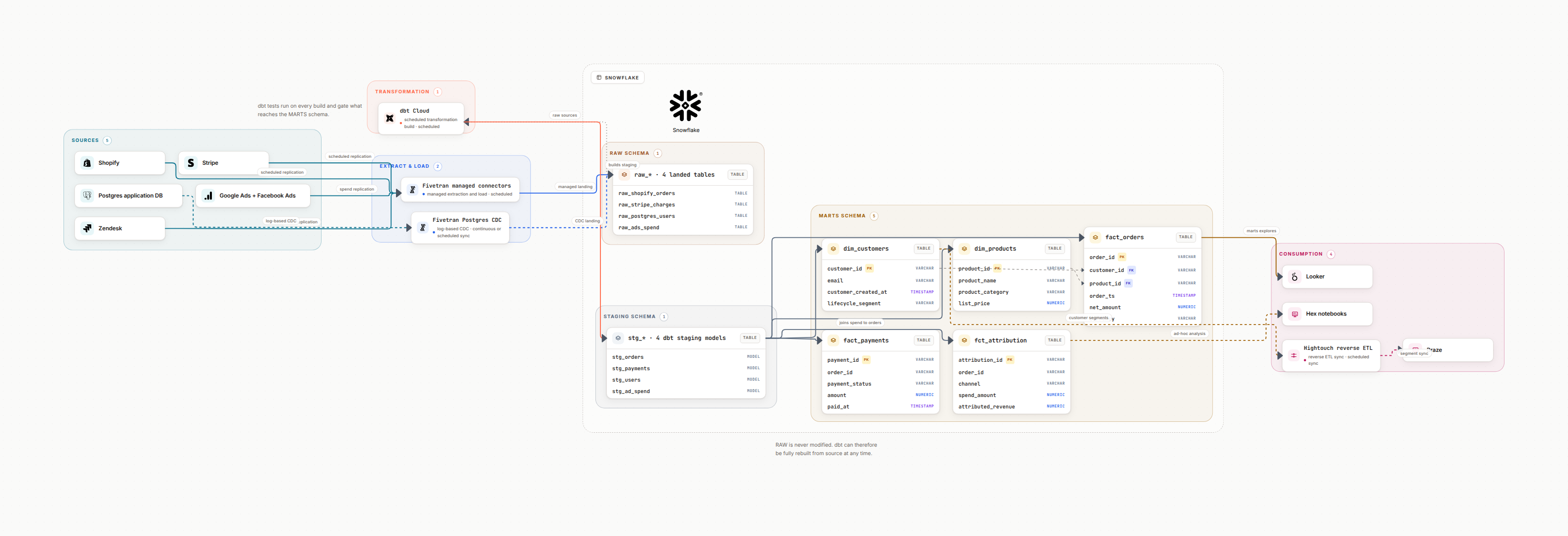
Why architecture diagrams still win reviews
Architecture diagrams communicate boundaries and responsibilities faster than docs. They make design reviews, SOC2 evidence, and onboarding smoother.
Keep them focused on contracts: what enters, what leaves, who owns each boundary.
Shared understanding
Engineers, analysts, and security see the same map.
Decision history
Capture trade-offs (batch vs streaming, lakehouse vs warehouse).
Audit ready
Highlight encryption, retention, and access controls.
Repeatable exports
Keep JSON + SVG/PNG so updates are painless.
Foundations of a solid architecture diagram
A good diagram shows domains, layers, and contracts. Avoid clutter by grouping related services and showing only critical paths.
- Domains across the top (marketing, product, finance) with owning teams.
- Layers: sources, ingest, storage (raw/refined/curated), processing, serving.
- Contracts on edges: protocol, schedule, retention, failure behavior.
- Non-functional needs: latency targets, compliance zones, cost boundaries.
- Observability: where logs, metrics, and traces are emitted.
Governance and risk cues to include
Architecture diagrams should answer security and compliance questions without another meeting.
PII and PCI markers
Mark where sensitive data lands and how it is protected.
Access boundaries
Show IAM roles, VPC boundaries, and row-level security.
Lineage hooks
Note where lineage is captured for audits.
Retention and backup
Call out retention policies and disaster recovery paths.
Workflow to keep it accurate
Regenerate from prompts tied to your inventory, review once, and publish everywhere the team works.
Simple loop
- • Generate from current systems and contracts.
- • Review owners, SLAs, and governance markers.
- • Export SVG/PNG and store JSON in git for diffs.
- • Publish to wiki and link from runbooks with a date.
Prompts for architecture diagrams
Publish checklist
FAQ
How is an architecture diagram different from a flow diagram?
Architecture diagrams show components, boundaries, and responsibilities. Flow diagrams emphasize the movement of data. Use both: architecture for design reviews, flow for operations.
What layers must appear on a data architecture diagram?
Sources, ingestion, storage zones (raw/refined/curated), processing engines, serving layers, governance and security controls, and observability.
How do I keep architecture diagrams current?
Regenerate from prompts tied to your latest inventory, store the JSON source in git, and set a quarterly review. Avoid editing one-off slides that drift.
Can I include cloud resources?
Yes. Reference specific services (S3, BigQuery, Databricks, Snowflake, Kafka) and note regions, encryption, and network boundaries.
Generate architecture diagrams your team trusts
Use AI plus a repeatable checklist to keep diagrams aligned with what runs in production.
Generate a diagram, free