Generate an architecture diagramstraight from your repository.
Connect a GitHub, GitLab, or Azure DevOps repo and get an architecture diagram plus an architecture.md that stay current as the code moves.
Included on every account · No subscription · Read-only access
 GitHub
 GitLab
 Azure DevOps
How it works
Three steps, then it maintains itself
A diagram per branch or tag, generated from the files that define the system.
Connect read-only
Point Datadef at a GitHub, GitLab, or Azure DevOps repo. Public repos need no token, private repos take a read-only token. Datadef never writes to your repository.
Pick a branch or tag
Each diagram tracks one ref: main, a release tag, a feature branch. Datadef reads the repo first, then asks what you want drawn.
Embed it and forget it
You get the diagram and an architecture.md. A daily sync regenerates both when the code moves. Refresh any time, from the app or your agent.
No blank prompt.
The options it proposes, the deployment topology, the data flow, one service in detail, come from your code, not a template.
The living embed
A README that stops rotting
Public projects get an architecture.md with the embed line already in it. Paste it anywhere markdown renders; every copy updates when the diagram does.
What the sync writes
## Architecture
Events land in Kafka, Flink jobs sessionise them, and ClickHouse serves the dashboards.
_Embedded from Datadef. The daily sync keeps it matching main._
The highlighted line is the live embed. The rest covers the components, the data flow, and how the system deploys.
What readers see
Architecture
Events land in Kafka, Flink jobs sessionise them, and ClickHouse serves the dashboards.
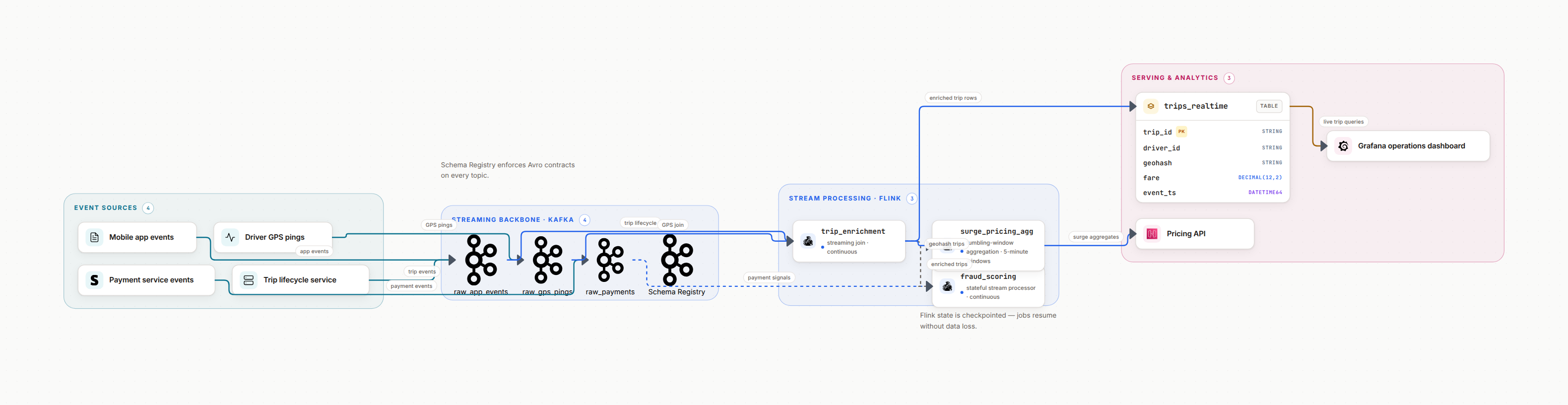
Embedded from Datadef. The daily sync keeps it matching main.
Static example. On your project the image is live and picks up canvas changes within minutes.
For Terraform
Parsed file by file, not guessed from a sample
Terraform repositories get their own pipeline. Datadef parses every .tf file first, builds the real graph of stacks, modules and resources, and only then draws. The diagram starts right away, no focus question, and it reads like the repo: modules as zones, resources with their provider icons.
Stacks and modules become zones; cross-module wiring becomes the arrows
count and for_each stay honest: one node with the real numbers per environment
Registry modules recognized with source and version; grants and role assignments summarized as a note, never fifty boxes
The doc gains a generated module reference table, the terraform-docs habit kept current by the sync.
One sync of a real platform repo
123 resources, 30 data lookups, 5 stacks, 11 modules, 3 environments
repeated types rolled up with counts: 10 catalogs in DEV, 1 in PROD, one node
36 nodes in 12 module zones, wiring included, refreshed daily
For agents
Your agent can check it and refresh it
Repo diagrams are reachable from Claude Code, Cursor, or any MCP client. Ask whether the diagram still matches the code, and trigger a re-sync when it should not wait for the daily run.
repo_status reports the link, the connection, and how fresh the diagram is
repo_refresh triggers a sync on demand, straight from the conversation
Unchanged code means an untouched diagram: syncs skip when the ref has not moved
> Is the platform diagram still in sync with main?
repo_status
synced 2 hours ago · ref main · diagram matches the last commit
> We just merged the ingestion service. Refresh it.
repo_refresh
sync started · the diagram and architecture.md regenerate from the new commit
Honest answers
Do private repositories need write access?▼
No. Public repositories need no token at all. Private repositories use a read-only personal access token: Contents Read-only on GitHub, read_api on GitLab, Code Read on Azure DevOps. The token is stored encrypted, only its last 4 characters are ever shown again, and Datadef never writes to your repository.
What does Datadef actually read?▼
Not the whole repo. It selects a bounded set of the most architecture-dense files: infrastructure as code, containers and orchestration, database schemas and dbt models, API specs, CI pipelines, and manifests, plus a compact summary of the directory tree. The diagram is grounded in those files, so architecture that appears nowhere in them will not be drawn.
What happens to manual edits I make on the canvas?▼
Every sync regenerates the diagram from the code, so manual canvas edits can be replaced on the next refresh. If you want to hand-tune a repo diagram, turn off its daily sync or unlink it first. A published version also preserves the state you want to keep.
Which providers are supported?▼
GitHub, GitLab, and Azure DevOps, on their cloud hosts: github.com, gitlab.com, and dev.azure.com. Self-hosted instances such as GitHub Enterprise Server or self-managed GitLab are not supported yet.
Do I need a subscription for repository sync?▼
No. Repository sync is included on every account, permanently, with no subscription for individuals. Sign up and connect a repository right away. A sync spends credits only when the repo actually changed, so a run that finds nothing new costs nothing.
What happens when my credit balance is empty?▼
Nothing is deleted and nothing is locked. Every diagram and doc stays viewable, editable by hand, exportable, and existing embeds keep rendering the last synced version. Only the redraw pauses: syncs resume the next time there are credits to spend.
Point Datadef at a repository
Connect a repo, pick a branch, and get an architecture diagram plus an architecture.md that keep themselves current. Repository sync comes with every account, with no subscription.