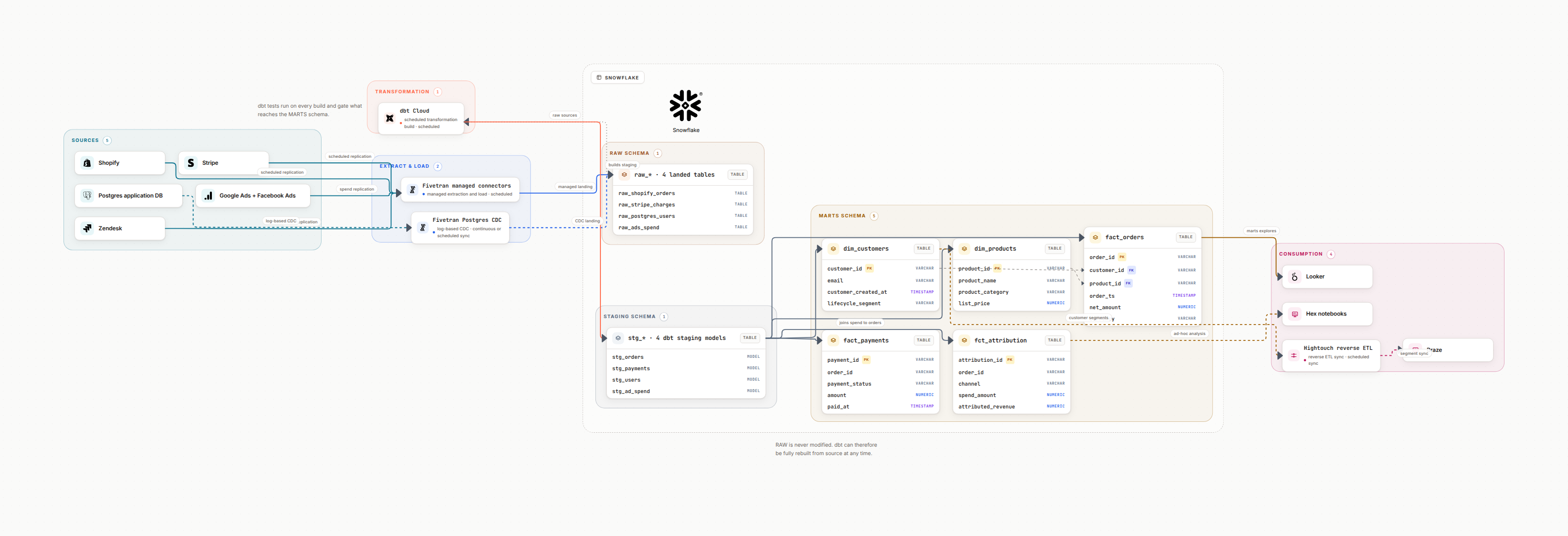
1. Three-Layer Architecture
Snowflake's architecture separates storage, compute, and services into independent layers. This is the key innovation, each layer scales independently without affecting the others.
Storage Layer
Compressed columnar storage in S3/Azure Blob/GCS. You pay for data stored, not for compute. Automatic micro-partitioning.
Compute Layer
Virtual warehouses (clusters) that spin up/down independently. Each warehouse has its own cache and resources.
Cloud Services
Query parsing, optimization, metadata, security, RBAC, and result caching. Always running, minimal cost.
2. Virtual Warehouse Design
Common Mistake: One Warehouse For Everything
Don't run ETL and BI queries on the same warehouse. Heavy transformations will slow analyst dashboards. Separate by workload.
| Warehouse | Size | Auto-Suspend | Use Case |
|---|---|---|---|
| ETL_WH | Large / XL | 1 min | dbt models, Airflow jobs |
| BI_WH | Medium | 5 min | Looker, Tableau, Metabase |
| ADHOC_WH | Small | 1 min | Analyst exploration |
| ML_WH | XL (Snowpark) | 1 min | ML training, feature engineering |
3. Data Sharing
Snowflake Data Sharing is a game-changer: share live, read-only data with other accounts without copying or ETL. The consumer queries the provider's storage directly.
Secure Data Sharing
Share specific databases/schemas with named accounts. No data movement, always fresh, zero-copy.
Data Marketplace
List datasets on Snowflake Marketplace for external consumption. Monetize your data assets.
Cross-Region Replication
Replicate databases across regions for disaster recovery and low-latency access in multiple geographies.
Reader Accounts
Share data with non-Snowflake customers via managed reader accounts. You pay their compute.
4. Cost Optimization
Right-size warehouses, start small, scale up based on queue depth
Auto-suspend warehouses after 1-5 min of inactivity
Set resource monitors with credit alerts at 80%
Use clustering keys for tables > 1TB with predictable filters
Separate ETL and BI into different warehouses
Leverage result caching (free re-execution within 24h)
Monitor queries with QUERY_HISTORY and WAREHOUSE_METERING_HISTORY
Use Snowpipe for continuous ingestion (cheaper than batch)
5. Common Design Patterns
Medallion Architecture
Bronze → Silver → Gold layers in Snowflake databases. Raw ingestion, cleaned/conformed, and business-ready datasets.
Hub-and-Spoke
Central data team manages shared datasets. Domain teams have their own schemas/warehouses for domain-specific models.
Data Mesh on Snowflake
Each domain gets their own database/schema with cross-database sharing. Federated governance via roles and policies.
Real-Time + Batch Hybrid
Snowpipe for streaming ingestion, dbt for batch transformations. Combine near-real-time and scheduled processing.
6. FAQ
What is Snowflake architecture?
How do you optimize Snowflake costs?
What is Snowflake Data Sharing?
Diagram your Snowflake architecture
AI-powered architecture diagrams with Snowflake icons. Map warehouses, databases, pipelines, and data flows.
Try Datadef Free