An architecture diagram editorthat opens before the signup form.
The Datadef canvas is free to open and built for data: typed nodes, tables with real columns, KPIs, freehand notes, and 500+ tech icons. Every AI-generated diagram lands here fully editable.
Free · No account · 1 AI generation a day · Saves in your browser
How it works
Open, draw, keep what matters
The free scratch pad is the full editor, not a demo with the good parts removed.
Open the scratch pad
One click, no account, no download. The scratch pad is the same editor as the full product, working on a canvas saved in your browser.
Draw it or generate it
Drag typed nodes, connect flow edges, sketch freehand notes. Or describe the system and let AI draft the first pass, 1 AI generation a day, free.
Keep it when it matters
Sign up when a diagram deserves to outlive the browser: cloud projects, version history, collaboration, and export are all included on the account, with no subscription.
Nothing comes out flat.
An AI-generated diagram is not a picture. It is the same editable canvas document, so you fix the one wrong edge instead of regenerating and hoping.
Inside the editor
Typed nodes, real columns, one canvas
Tables carry columns, KPIs carry definitions, zones nest, and column-level lineage draws in its own layer, so the flow picture stays readable.
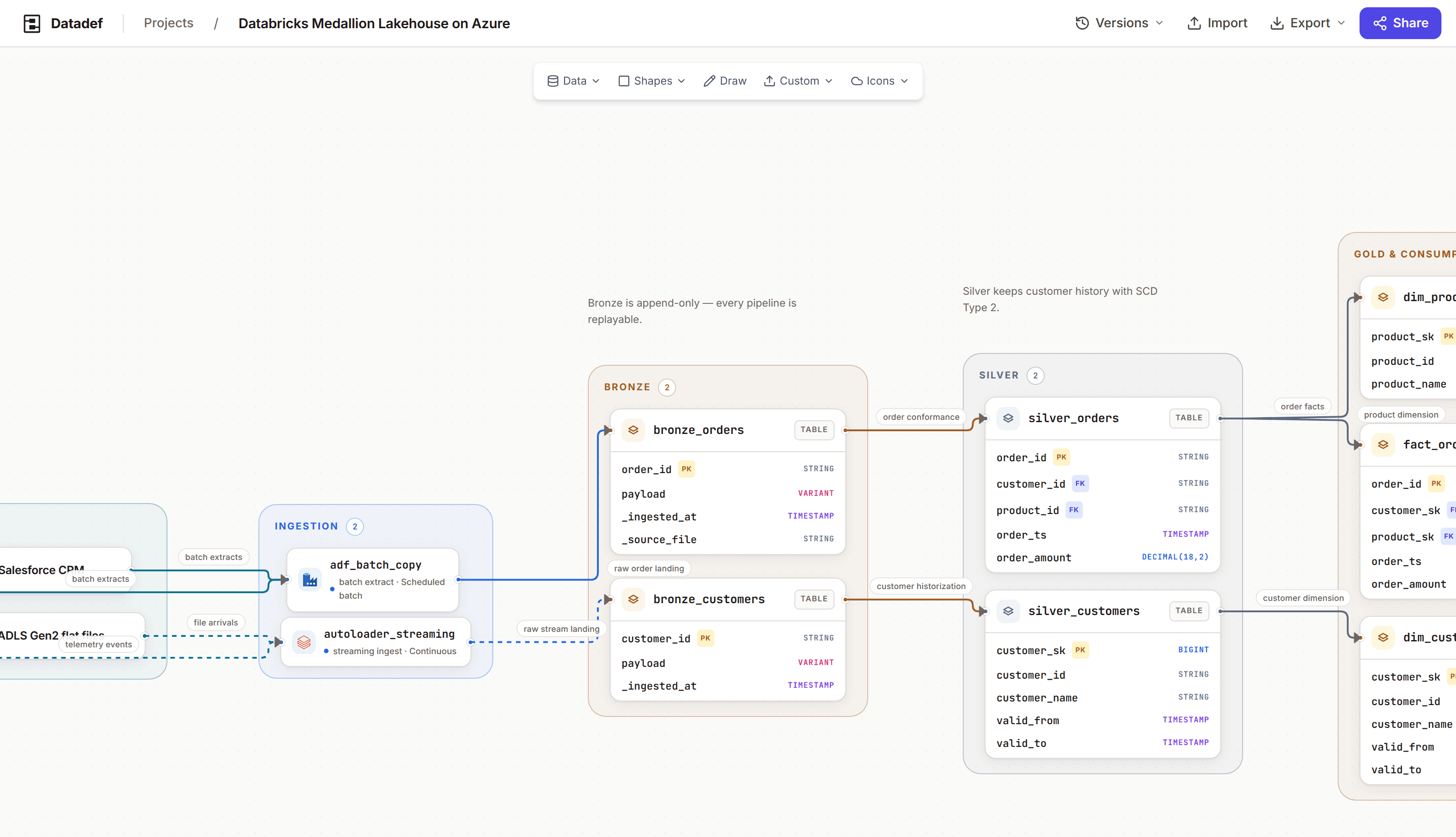
The canvas: typed nodes, labeled flow edges, nested zones, and annotations.
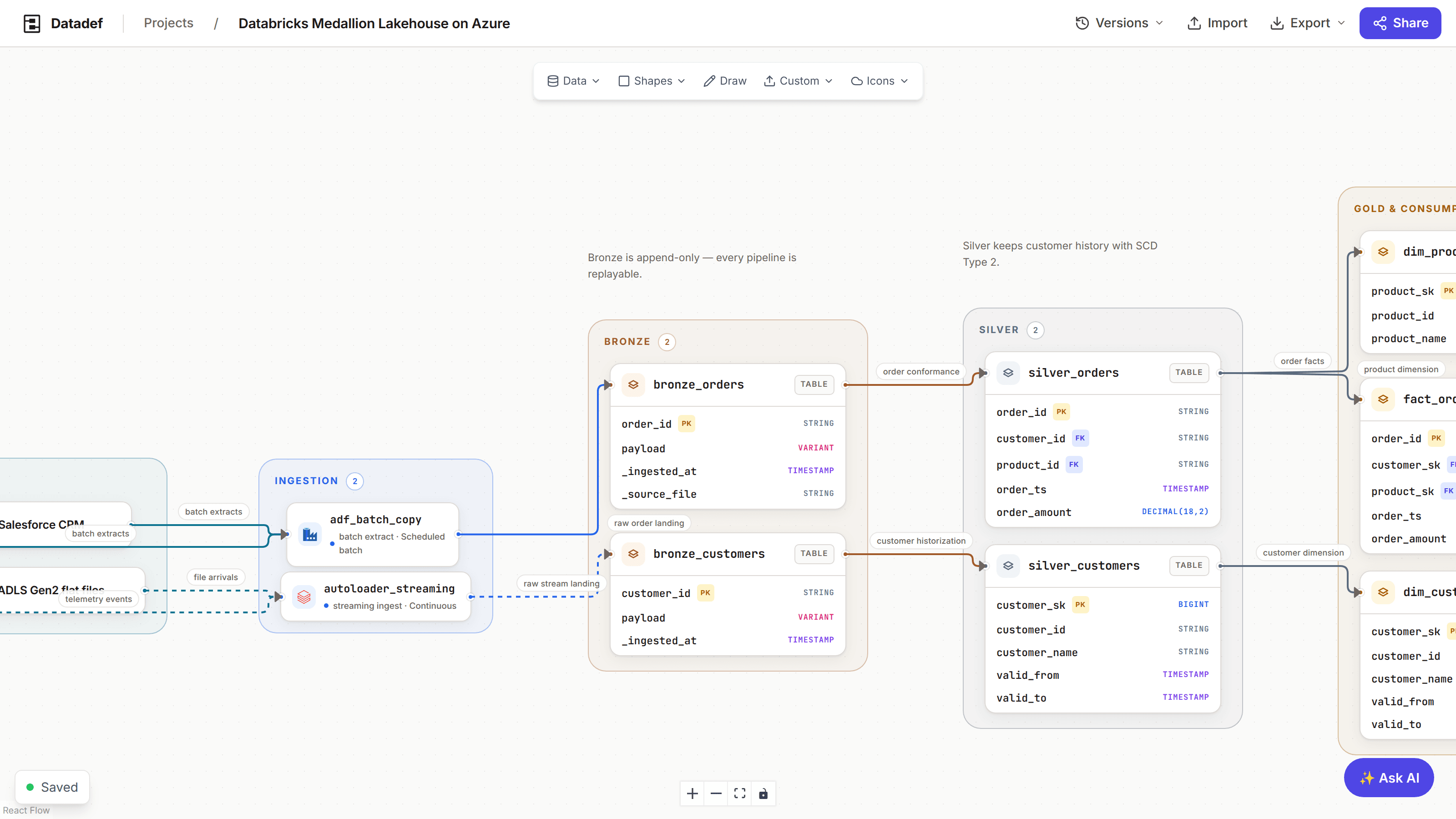
The properties panel: select anything to edit its name, columns, colors, icon, and metadata.
What costs what
Free where you draw, paid where you keep
The editing is free. The plan is for what happens to a diagram after you close the tab.
In the scratch pad, free
- The full editor: every node type, edges, zones, annotations
- Freehand drawing and 500+ tech icons
- Column-level lineage between real table columns
- 1 AI generation a day, no account
- Saves locally in your browser
With a free account
- Cloud projects that follow you across devices
- Published versions you can restore
- Real-time collaboration on the same canvas
- PNG and JPEG export, sharing links, live embeds
- All of it included, permanently, with no subscription
Honest answers
Is the editor actually free?▼
The scratch pad is. It is the same canvas as the full product, open to anyone with no account: unlimited manual editing plus 1 AI generation a day. With an account, cloud projects, versions, collaboration, and image export come too, included permanently and with no subscription. Only AI generation is metered, in credits.
Where do scratch diagrams live?▼
In your browser. The scratch pad saves to local storage on your machine, so the diagram is there when you come back in the same browser. Clearing site data deletes it, and it does not follow you across devices. When you sign up, your scratch diagram comes along and can become a cloud project.
Can I edit a diagram the AI generated?▼
Yes, all of it. Generation writes a regular canvas document, not an image: every node, edge, and zone it draws is selectable and editable, exactly as if you had placed it yourself. You fix the one wrong edge instead of regenerating and hoping.
What can I export?▼
PNG and JPEG images of the canvas. Export is included on every account, with nothing to pay for it. There is no PDF export today. Live embeds and public links are included too, and they stay current in a wiki where a static export goes stale.
What makes it a data diagram tool rather than a generic canvas?▼
Nodes are typed. A table holds real columns, a KPI holds a definition, and sources, pipelines, and consumption endpoints are distinct things. Column-level lineage is its own layer on top of flow edges, so the detail is real without cluttering the picture. A generic whiteboard makes you fake all of that with text boxes.
What needs an account?▼
Cloud projects that persist beyond one browser, version history you can restore, real-time collaboration, sharing links, and PNG and JPEG export. Signing up takes an email, and all of it is included from then on, with no subscription. Only AI generation is metered, in credits, and a new account starts with 1 credit.
Open the editor and draw
No account, no download, no trial clock. The scratch pad is the full canvas, saved in your browser, with 1 AI generation a day when you want a head start.